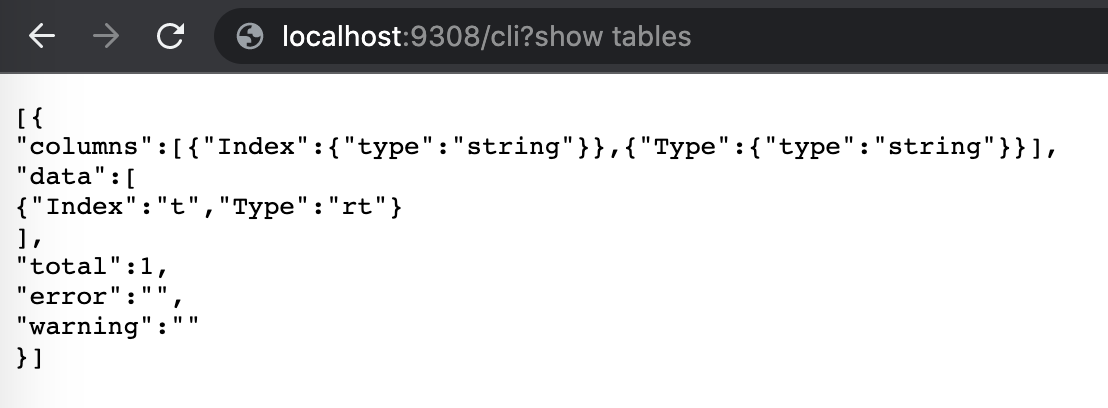
You can connect to Manticore Search over HTTP/HTTPS.
By default Manticore listens for HTTP, HTTPS and binary requests on ports 9308 and 9312.
In section “searchd” of your configuration file the HTTP port can be
defined with directive listen like this:
Both lines are valid and equal by meaning (except for the port number), they both define listeners that will serve all api/http/https protocols. There are no special requirements and any HTTP client can be used to connect to Manticore.
searchd {
...
   listen = 127.0.0.1:9308
   listen = 127.0.0.1:9312:http
...
}
All HTTP endpoints respond with application/json content
type. Most endpoints use JSON payload for requests, however there are
some exceptions that use NDJSON or simple URL encoded payload.
There is no user authentication implemented at the moment, so make sure the HTTP interface is not reachable by anyone outside your network. Since Manticore acts like any other web server, you can use a reverse proxy like Nginx to add HTTP authentication or caching.
The HTTP protocol also supports SSL
encryption: If you specify :https instead of
:http only secured connections will be
accepted. Otherwise if no valid key/cert provided, but client tries to
connect via https - the connection will be dropped. If you send not
HTTPS, but an HTTP request to 9443 it will answer with HTTP code
400.
searchd {
...
   listen = 127.0.0.1:9308
   listen = 127.0.0.1:9443:https
...
}Separate HTTP interface can be used to perform ‘VIP’ connections. A connection in this case bypasses a thread pool and always forcibly creates a new dedicated thread. That’s useful for managing Manticore Search in case of a severe overload when the server would either stall or not let you connect via a regular port otherwise.
Read more about listen in this section.
searchd {
...
   listen = 127.0.0.1:9308
   listen = 127.0.0.1:9318:_vip
...
}Endpoint /sql allows running an SQL SELECT
query via HTTP JSON interface.
Query payload must be URL encoded, otherwise query
statements with = (filtering or setting options) will
result in an error.
It returns a JSON respons which contains hits information and
execution time. The response has the same format as json/search
endpoint. Note, that /sql endpoint supports only single
search requests. If you are looking for processing a multi-query see
below.
POST /sql -d "query=select id,subject,author_id from forum where match('@subject php manticore') group by author_id order by id desc limit 0,5"{
"took":10,
"timed_out": false,
"hits":
{
"total": 2,
"hits":
[
{
"_id": "1",
"_score": 1,
"_source": { "gid": 11 }
},
{
"_id": "2",
"_score": 1,
"_source": { "gid": 12 }
}
]
}
}/sql endpoint also has a special mode
“raw”, which allows to send any valid sphinxql
queries including multi-queries. The returned value is a json
array of one or more result sets.
POST /sql?mode=raw -d "query=desc%20test"[
{
"columns": [
{
"Field": {
"type": "string"
}
},
{
"Type": {
"type": "string"
}
},
{
"Properties": {
"type": "string"
}
}
],
"data": [
{
"Field": "id",
"Type": "bigint",
"Properties": ""
},
{
"Field": "title",
"Type": "text",
"Properties": "indexed"
},
{
"Field": "gid",
"Type": "uint",
"Properties": ""
},
{
"Field": "title",
"Type": "string",
"Properties": ""
},
{
"Field": "j",
"Type": "json",
"Properties": ""
},
{
"Field": "new1",
"Type": "uint",
"Properties": ""
}
],
"total": 6,
"error": "",
"warning": ""
}
]While the /sql endpoint is useful to control Manticore
programmatically from your application, there’s also endpoint
/cli which makes it eaiser to maintain a Manticore instance
via curl or your browser manually. It accepts POST and GET HTTP methods.
Everything after /cli? is taken by Manticore as is even if
you don’t escape it manually via curl or let the browser encode it
automaticaly. The + sign is not decoded to space as well,
eliminating the necessity of encoding it. The response format is the
same as in the /sql?mode=raw.
POST /cli -d "select id,1+2 as a, packedfactors() from test where match('tes*') option ranker=expr('1')"[
{
"columns": [
{
"id": {
"type": "long long"
}
},
{
"a": {
"type": "long"
}
},
{
"packedfactors()": {
"type": "string"
}
}
],
"data": [
{
"id": 1,
"a": 3,
"packedfactors()": "bm25=616, bm25a=0.69689077, field_mask=1, doc_word_count=1, field0=(lcs=1, hit_count=1, word_count=1, tf_idf=0.25595802, min_idf=0.25595802, max_idf=0.25595802, sum_idf=0.25595802, min_hit_pos=1, min_best_span_pos=1, exact_hit=0, max_window_hits=1, min_gaps=0, exact_order=1, lccs=1, wlccs=0.25595802, atc=0.000000), word0=(tf=1, idf=0.25595802)"
},
{
"id": 2,
"a": 3,
"packedfactors()": "bm25=616, bm25a=0.69689077, field_mask=1, doc_word_count=1, field0=(lcs=1, hit_count=1, word_count=1, tf_idf=0.25595802, min_idf=0.25595802, max_idf=0.25595802, sum_idf=0.25595802, min_hit_pos=1, min_best_span_pos=1, exact_hit=0, max_window_hits=1, min_gaps=0, exact_order=1, lccs=1, wlccs=0.25595802, atc=0.000000), word0=(tf=1, idf=0.25595802)"
},
{
"id": 8,
"a": 3,
"packedfactors()": "bm25=616, bm25a=0.69689077, field_mask=1, doc_word_count=1, field0=(lcs=1, hit_count=1, word_count=1, tf_idf=0.25595802, min_idf=0.25595802, max_idf=0.25595802, sum_idf=0.25595802, min_hit_pos=2, min_best_span_pos=2, exact_hit=0, max_window_hits=1, min_gaps=0, exact_order=1, lccs=1, wlccs=0.25595802, atc=0.000000), word0=(tf=1, idf=0.25595802)"
}
],
"total": 3,
"error": "",
"warning": ""
}
]